
Images
AI Images for Blog Posts That Match the Article
Write & Grow makes AI images for blog posts as part of every article: a featured image at the top and pictures under the headings further down. Each AI picture is checked against the article before it goes in, and a picture that doesn’t fit holds the post back until you look at it.
The Pictures Each Article Gets
An AI picture is the default. For how-to guides, a picture of the real thing often helps a reader more, so you can switch those on for each website.
Featured image
Drawn for the article’s title and angle, plain or with the title written on it, and with the logos of companies in the headline if you want them.
Pictures in the article
Two to four, by length: about 1,200 words gets two, 2,000 or more gets four. They go under headings part-way down, never under the FAQ.
Real error screens
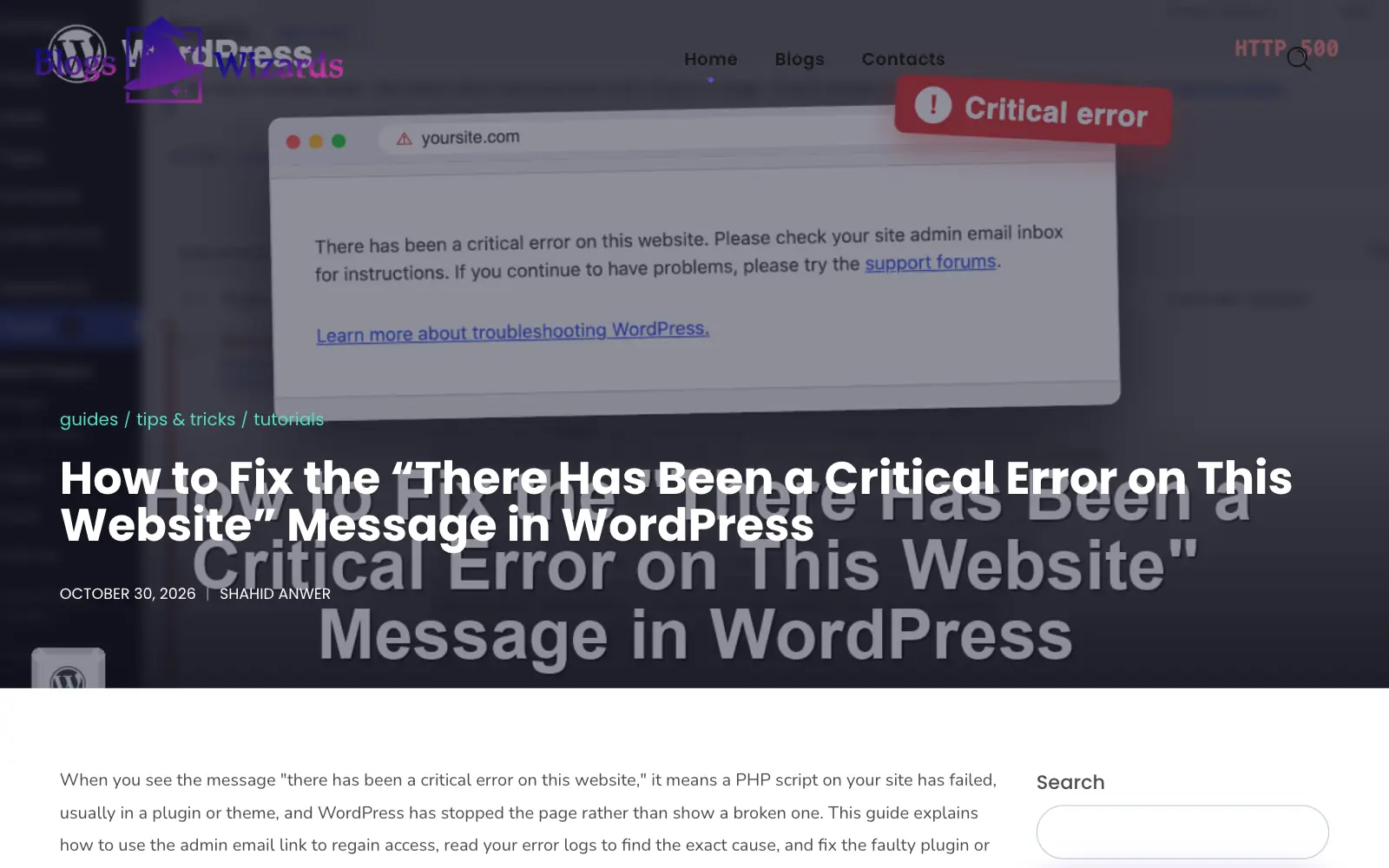
A guide about one WordPress error, such as “Error establishing a database connection”, gets that screen as its featured image, in WordPress’s own wording and styling.
Code pictures
A section that asks the reader to change code gets a picture of that code in an editor, with line numbers and the changed lines highlighted. It is drawn from the article’s own code block.
Explainer graphics
A section with a table, a list of options or steps in order becomes a chart, table, cards or a flow, using only the section’s words. A number the section doesn’t contain is thrown away.
Social image
Facebook and X can show a copy with the title on it, set through Rank Math, while your site keeps the plain picture.
How the Image Check Works
Image models get details wrong: a ball balanced on a putter, or a jungle path for a story about a golf tournament. So every AI picture is looked at before it is used.
Write the prompt from the article
The featured image prompt comes from the title, keywords and angle. A picture further down gets one from its own section.
Look at the picture like an expert reader
The check says what the picture really shows and lists anything that makes it wrong for this article: off-topic, impossible, the wrong equipment, garbled text or fake logos.
Draw again when it is wrong
A picture with a serious mistake is redrawn from a prompt rewritten to avoid that mistake, up to three times.
Fall back to a simpler scene
If the exact setup still comes out wrong, one simpler scene of the same subject is drawn. A plain picture the model can get right beats a detailed one it can’t.
Keep the best, and say what is still wrong
The picture with the fewest problems is kept, and any problem left is shown on the draft page.
Hold the post until you decide
A draft with a flagged picture is not auto-posted. Replace the picture, or choose “Use images anyway” to release it.
Fix a Picture Without Leaving the Draft
Every picture on the draft page has its own tools. You don’t need a separate photo editor.
The image editor
Change what a picture shows, or bring in your own:
- Crop to a shape, or fit the whole picture with a blurred fill at the sides
- Drag boxes over a logo, number plate or face to blur it
- Combine two pictures side by side or one above the other, with labels such as Before and After
- Take a frame from your own video, stepping one frame at a time
- Upload your own JPG, PNG or WebP file
- Regenerate from the prompt, edited or as it was
What goes to your site
Each picture is uploaded to the site’s media library and placed under its heading, with:
- Alt text written from what the picture shows, not just the heading
- An optional caption and credit, in the same figure WordPress’s image block uses
- WebP copies of new uploads when Astute Pro’s image optimization is on
What Counts Against Your AI Pictures
Each extra picture uses 1 credit from your plan’s monthly credits (800 on Starter, 2,200 on Pro, 6,800 on Agency and 18,500 on Agency Plus). Credit packs add more if a busy month needs them.
Pictures that aren’t drawn by AI don’t count, and neither does the featured image.
| Picture | Uses from your allowance |
|---|---|
| Featured image | Nothing. Every article gets one. |
| Social image with the title | Nothing. It is made from the featured image. |
| AI picture in the article | One AI picture |
| Regenerating an AI picture | One AI picture |
| Infographic | One AI picture |
| Code picture, explainer graphic or error screen | Nothing |
| Crop, blur, combine, video frame or your own upload | Nothing |
A Real Screen on a Live Guide
Blogs Wizards, one of our own sites, runs WordPress how-to guides. This one is about a single error, so its featured image is the screen readers actually see.
Blog Image Questions
No. Every article’s credits include its own featured image. Extra pictures, such as pictures inside the article and pictures you regenerate, use 1 credit each.
The best picture is kept and its problems are listed on the draft page. If the site auto-posts, that draft waits until you replace the picture or choose “Use images anyway”.
Yes. Upload a JPG, PNG or WebP in place of any picture, take a frame from a video, or combine two of your own photos into one.
Yes. Alt text describes what the picture shows, so a screen reader doesn’t just repeat the heading. You can add a caption and a credit too.
You can switch on code pictures, real error screens and explainer graphics for each website. Sections they fit get those instead of an AI picture, and they cost nothing from your plan.
Free to set up
Start Growing Your Site With Articles You Can Trust.
Connect your WordPress site and add your sources for free, then choose a plan when you’re ready to write.